
Place the two endpoints
A point-to-point plan represents a wireless connection between two radios—for example, a main building and a detached workshop. In the Mapper, use Devices to add an access point at each proposed endpoint. Give them distinct names such as “Main building bridge” and “Workshop bridge.” Choose the intended make and model where available.
Use the access-point device type for the bridge radios. Selecting a model documents your choice; it does not configure the physical radios or prove that they are compatible.
Create the wireless link
- Select the first access point and expand its details.
- Find Wireless planning.
- Under Add wireless link, choose the second access point or bridge.
- Inspect the link drawn between the devices. Select the link on the map to see its endpoint names and distance. The access-point connection details also show Wireless distance.
- Save your project after checking the endpoints.
The connection is recorded at both ends, so you do not need to add it again from the second radio. An access point already connected to the selected device is excluded from this dropdown.
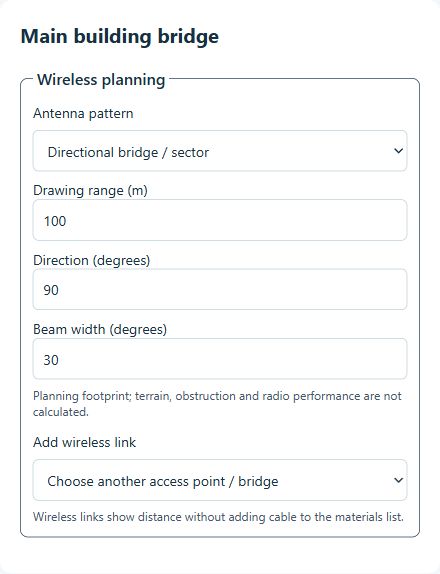
Draw an optional antenna footprint
Antenna pattern lets you choose No coverage drawing, Directional bridge / sector, or Omnidirectional. A link can exist without a coverage drawing.
For a directional footprint, set Drawing range (m), Direction (degrees) and Beam width (degrees). The range input is explicitly in meters. Aim each endpoint’s drawing toward its partner when illustrating a two-radio bridge; creating the link does not automatically aim the antennas.
These values control a planning drawing. Use the chosen radio’s antenna specifications and site requirements rather than treating the defaults as measured coverage.
Keep wireless distance separate from cable
A wireless link shows the endpoint-to-endpoint distance without adding that span as cable in the materials list. Do not represent the same radio hop with a normal cable connection if you want your cable totals to remain meaningful.
Physical cables still exist at each end: for example, from a network switch or injector to a radio. Draw those separately and account for the power method required by the equipment. The wireless distance is not a measurement of those cable routes.
What the drawing does—and does not—verify
The Mapper shows positions, an optional footprint and a distance. It does not calculate terrain, building obstruction, Fresnel clearance, signal strength, interference or achievable throughput. A line crossing a roof or tree is not evidence that the link will work.
Before purchasing or installing, verify the path, mounting heights, radio compatibility, power requirements and capacity for all cameras using the link. After installation, test the actual connection under expected traffic. Keep those findings with the project and its installation handoff.
Common questions
Is a wireless link counted as cable?
No. A wireless connection is excluded from cable quantities. Add the real wired connections at either endpoint separately.
Why is my second access point missing from the list?
The list excludes the selected device and any access point already connected to it. Check existing connections and confirm the other endpoint is an access-point device.
Will the Mapper configure my bridge?
No. It documents the proposed layout. Configure and test the radios using their own management tools.